

Cette page n’est pas encore traduite en français. Vous lisez la version anglaise.
Categories
Split one tournament into categories with their own places and fees, and keep a category private with an access code.
Categories split one tournament into separate entries, such as Advanced and Beginners. Each category has its own number of places and can have its own fee. When a tournament has categories, every player picks one when they register.
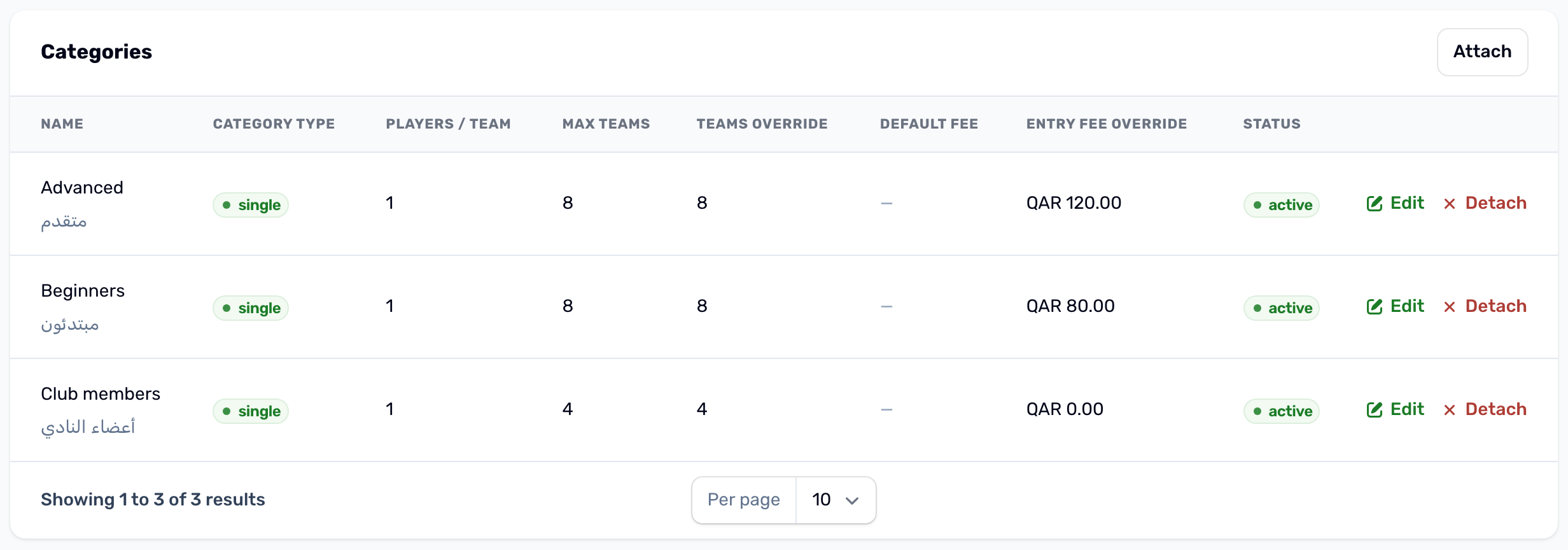
Create a category#
In the Categories tab press New category and fill in the category: its type (single players or teams), its name in English and Arabic, the players per team, the max teams, its default fee, its status and, for a private category, the access code. Under In this tournament you can also set the two overrides below. Saving creates the category for your club and attaches it to this tournament in one step.
Attach an existing category#
A category you created for an earlier tournament can be used again. Press Attach, pick it and fill in, if you need them:
- Teams override: the places for this category in this tournament. Leave it empty to use the category's own number.
- Entry fee override: the fee for this category in this tournament. Leave it empty to use the category's default fee, and then the tournament's entry fee.
Edit changes the category and both numbers later, and Detach removes the category from this tournament. A change to the category itself, such as its name, shows in every tournament that uses it.
Places#
A category is full when its pending and confirmed registrations reach its places. The app then shows it as FULL and players cannot pick it. The tournament's Maximum participants still applies on top of the categories.
Private categories#
A private category shows a lock in the app. A player who picks it must type its access code, and a wrong code is refused with Invalid access code. Give the code to the people it is for, for example at your front desk.
Players per team#
A team category with more than one player per team sets the roster size of the teams in it. See Teams and rosters.