

Esta página aún no está traducida al español, así que estás leyendo la versión en inglés.
Create a match
Book a court as a match: the format, public or private, who pays, your own spot on the pitch, the times, add ons and the rules.
A match is a court booking that other players can join. You book the court, choose how many play and who pays, and the app fills the free places for you. You become the organizer. Matches can be created on any court where the club has matches switched on.
Start a match#
Open a venue, go to its Matches tab and tap Create Match. The Create New Match screen opens. You need to be signed in.
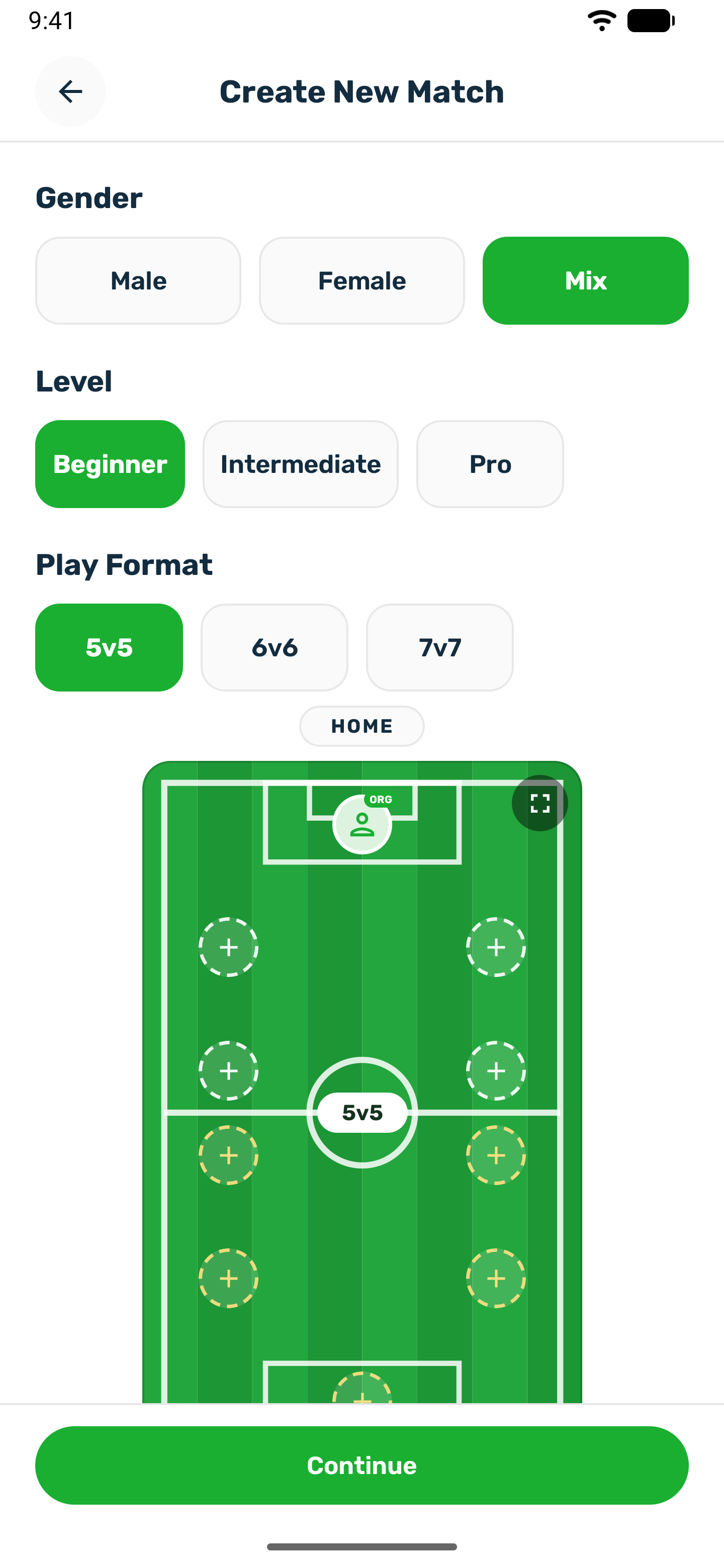
Fill in the match#
-
Sport and day
Pick the sport and the day. If the club asks for notice, the first days are dimmed and cannot be picked. -
Duration
Pick the length of the match from the lengths the court allows. -
Gender
Male, Female or Mixed. On a court for one audience only that choice is allowed, and the app tells you if you tap another. -
Play Format
The size of the match, such as 5v5 or 7v7, from the formats the court offers. It sets how many places there are. It cannot be changed after the match is created. -
Your spot
For sports with a pitch, a preview shows the players in formation. Drag them to arrange it, tap a spot to take it as yours, or open the full screen editor to pick a preset formation. -
Match Type
Public: anyone can find and join it. Private: only players with the match code can join. -
Invitations and who pays
Under Invitations, Allow players to invite others lets joined players invite friends into free spots. It is off for 1v1. I'll pay for the whole match lets you cover every place, and shows only when the court lets the fee be shared. I'm playing in this match is on unless you only organize, in which case your spot stays open for another player and you still pay the court fee. -
Choose a Court & Slot
Every court at the venue for your sport is listed with its open times and their prices. Tap a time. When the court allows it, turn on Select Multiple Slots to book a longer match from times next to each other on the same court. -
Add ons
Once a time is picked, you can add the court's rentals, such as balls or bibs. They are added to your own fee. Players who join do not pay for them. -
Continue
Tap Continue, read the Match Creation Rules & Terms, the club's own rules for the court or the app's defaults, and tap Agree.
Confirm and pay#
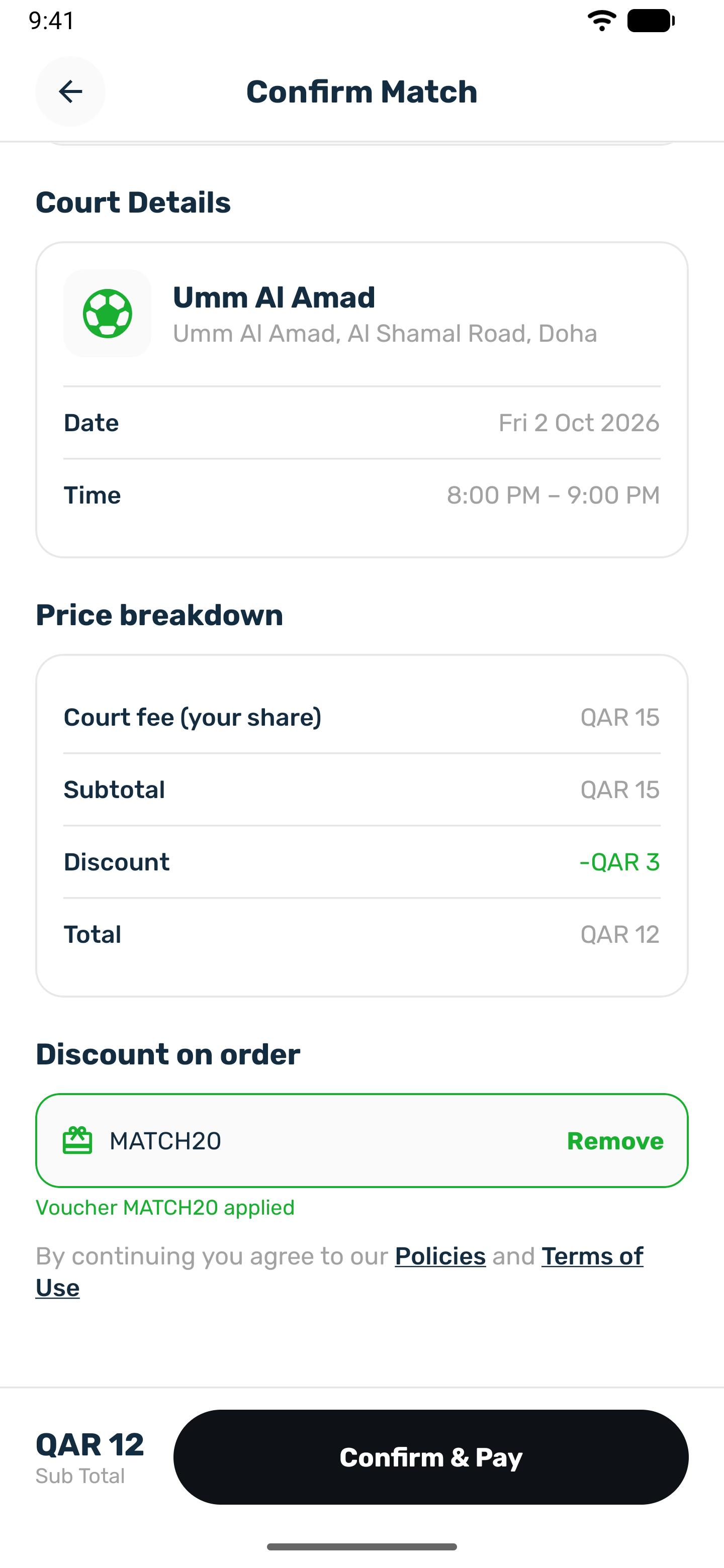
The Confirm Match screen sums everything up: the formation, the level, the match type, the court details with the date and time, and the price.
- Level: pick the level of the match from the sport's levels.
- Voucher: under Discount on order, type a code from the club and tap Add. The discount comes off your fee.
- The price: the court fee for the whole match, or your share of it, plus add ons, minus any voucher, and the total you pay now. The server works out the fee from the court's own prices for the times you picked, and that is what you are charged. How the share is worked out is in Who pays for the court.
Tap Confirm & Pay. The match is created and the payment sheet opens for your part. When you owe nothing, the button reads Confirm & Create Match and the match is created straight away.
After it is created#
- A private match shows its 6 digit invite code. Tap it to copy, or share it with your players. Only you see the code afterwards, on the match page.
- A public match appears in the venue's Matches tab and in Open Matches. Its time on the Book tab shows Join with the number of players, so people booking the court can join instead.
- Invite players into the free spots from the match page. See Invite players.
If the app refuses the match#
| Reason | What to do |
|---|---|
| The time was just booked | Pick another time. |
| The length is shorter or longer than the court allows | Pick another duration or fewer times. |
| Too soon for this court | The court needs the match created some days ahead. Pick a later day. |
| Too far ahead for this court | The club takes bookings only so many days ahead. Pick an earlier day. |
| The gender does not match the court | Pick the court's audience. |
| The voucher is not valid | The app tells you why, for example expired, already used or below its minimum. Remove it or try another. |